Designing prompt enhancement for an AI design tool
How I redesigned a feature that pivoted ten times in one working week, and what I learned about the limits of UX in AI products.
Company
Renovate AI
Platform:
Mobile and web
Status:
Final prototype. Usability testing scoped, not yet run
Timeline
One intensive design cycle
Preview
TL;DR
Renovate AI users edit interior spaces with text prompts, but prompts were either too vague or too rambling, both producing bad results. The dev team had built a modal-based "Improve / Simplify" solution before I got involved.
I was pulled in to critique it and redesign it. What followed was the most pivot-heavy project I've worked on. The final design is a lightweight "Refine" affordance offering two AI-assisted prompt actions, with deliberate consistency across mobile and web. The most useful thing I took from the project was not the final UI. It was the moment I realized the biggest problem had nothing to do with UX.
Context
Renovate AI (RAI) lets homeowners, real estate agents, and interior designers generate and edit images of spaces from text. Users either start from a generated image or upload their own, then iterate with targeted edits like "change the coffee table to marble" or "swap the sofa for a cream sectional."
The feature sits on two surfaces:
Generation (mostly web): users write long descriptive prompts for whole rooms
Edit (mobile and web): users make targeted changes
It also coexists with a materials library (accessible via @ mention), an inspiration library, a history feature, and a "Renovation Spectrum" slider that controls how aggressively the AI deviates from the source image.
The inherited problem
The dev team had already shipped an initial design. A "Complex prompt" warning banner triggered next to a permanent "Prompt Enhance" button. Tapping either opened a modal with Improve and Simplify side by side.
I was asked to critique it. Four things jumped out:
Two nudges, one job. The warning banner and the Enhance button competed for the same intent. Users wouldn't know which to use, and a warning banner is a weird pattern for a helpful feature.
The "Improve" output rewrote user intent. This is the one that mattered most, and I'll come back to it. The sample Improve output substituted the user's stated preferences. Beige and cream neutrals became "industrial-chic exposed brick with cognac leather." Any UX on top of that is polish on a broken foundation.
Two options felt undercooked. Gmail's Help Me Write offers four (Polish, Formalize, Elaborate, Shorten). Notion has six. Improve and Simplify sound different but do similar work.
Modals are a 2022 pattern. Inline is where the market had moved.
What the market was doing
I anchored the competitive scan against NN/g's research, which distinguishes use-case prompt suggestions (teaching users what an AI tool can do) from prompt augmentation (helping users improve a prompt they've already started). Refine sits in the second category, which has fewer established patterns.
Within prompt augmentation, four patterns dominate: inline refinement chips (Gmail, Notion), auto-enhance toggle (Ideogram, Midjourney), side-by-side comparison (the dev team's modal), and structured prompt builders (Freepik). Interior design is actually a strong fit for the structured builder pattern, but the team had momentum behind enhancement, so I worked within that frame.
The first design move
Kill the modal, replace it with inline chips. Borrow from Gmail.
On mobile, I prototyped chips above the keyboard when the input is focused. This held until it collided with the materials @ mention picker, which lives in the same space. Two contextual helpers fighting for the same real estate. I set a rule: @ takes over when triggered, chips hide, one helper at a time.
That version lasted about a day.
The messy middle
Over the following week, the direction pivoted roughly ten times. Not because the problem changed. Because the team kept changing its mind about the problem.
The arc, briefly:
inline chips → dedicated entry point → bottom sheet → dynamic context-aware chips (killed by engineering cost) → state-aware chips → pencil icon revealing an amber panel above the input. The last one held.
What I took from this: the design kept morphing because the problem kept morphing. "Make it less work for users" and "make users feel guided as they type" pulled in opposite directions, and we never picked one. The right move was to stop designing and force that decision.
The moment UX stopped being the problem
Around pivot six, I re-ran the dev team's sample Improve output and watched it again. "Beige and cream neutrals with gray accents" became "industrial-chic loft with exposed brick, cognac leather seating, and iron fixtures."
Nothing about the chip pattern, the panel color, or the icon choice fixes that. The model was rewriting user intent, not refining it. No amount of UX polish rescues a feature whose primary job it does wrong.
This was the most important thing I learned on the project. AI features have two users: the person and the model. If the model substitutes preferences instead of clarifying them, the feature is broken upstream of design. Prompt engineering fixes became part of the feature spec.
What we landed on
Mobile
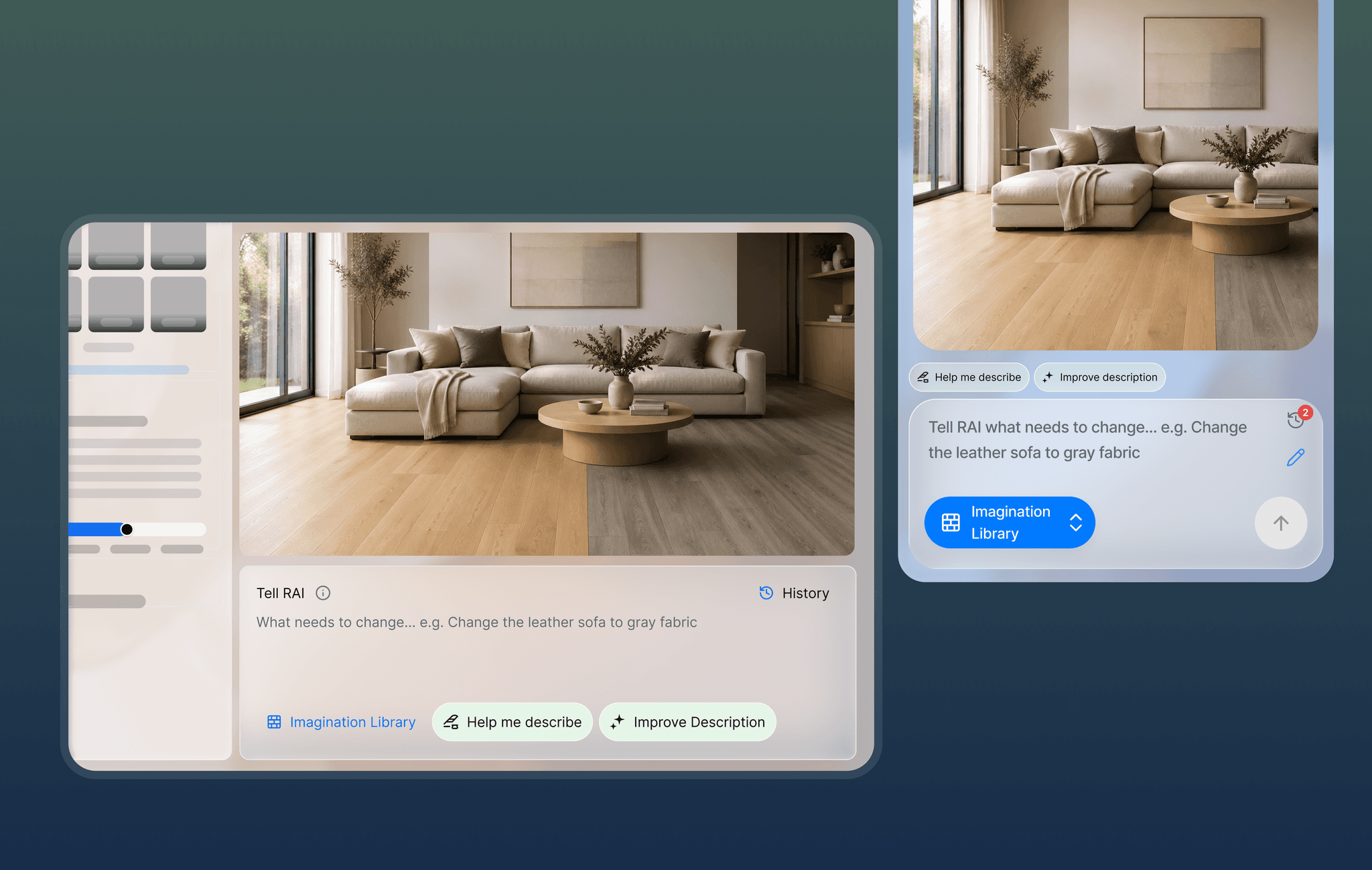
Tapping the pencil icon in the input card reveals an amber "Enhance Prompt" panel above the input. Two chips: Help me describe (enabled when empty) and Improve Edit (enabled when typed). The amber tone signals "AI feature" without needing a label.
Web
A "Refine" button sits next to History and Library. Tapping it opens a popover with the same two options:
Help me describe: Expand into rich, specific detail
Improve edit: Sharpen wording and intent
Same two actions, different surface. I chose "Refine" over "Prompt Assistant" because our users are not prompt engineers.
Tradeoffs I made, and what I gave up
Mobile
Discoverability for quietness. Always-visible chips would be more discoverable than a pencil-revealed panel. I traded first-time discovery for less visual noise. The usability test will tell us if that was the right call.
Cross-platform parity for platform fit. Mobile uses a panel, web a popover. Same options, different feel. A stricter designer would enforce parity. I chose native patterns on each platform.
Simplify. The team landed on Improve-only. If research shows users want to shorten as often as they expand, Simplify comes back.
What I'd do differently
Force problem alignment before designing. Ten pivots is the symptom; the cause was that the team never agreed whether the feature should do the work or guide users to do it. Next time, I stop the design work and run a 30-minute "what are we actually solving" session before opening Figma.
Test earlier, with less fidelity. I scoped a 5-user study near the end. Should have pushed for it at pivot three. Even five users would have broken the loop by introducing data into a debate running on opinion.
Push harder on the model output. Surfacing a concern in meetings is not the same as forcing a decision.
What's next
Run the 5-user moderated usability test with the final mobile prototype (open task, guided task, complex task)
Verify the model preserves user intent after the prompt engineering fixes
Adapt the pattern to web at full fidelity
Resolve the chat icon with the "2" badge (either label it or remove it)
Decide whether Simplify returns based on test data
What this project taught me about designing for AI
The model is part of the UX. You can design the cleanest chip pattern in the world. If the model rewrites user intent, the feature is broken. NN/g makes a related point: specific beats vague. A specific user prompt becoming a vague one is a regression, not an improvement, no matter what UI surfaces it.
"Less work" and "more control" are opposing forces. Every AI feature has to pick one as primary. Teams that don't pick end up cycling, which looks like pivots.
Discoverability is harder because there's no muscle memory yet. Users know what a send button does. They don't yet know what a pencil icon means in an AI product. Labels and microcopy matter more than they do in conventional UI.
This case study is about a feature that has not yet shipped or been tested with users. Everything I've claimed about it is what I believed by the end of the design cycle. The usability test will tell us which of those beliefs were right.